




Risk-reward is a simple idea: know what you’re risking and what you’re aiming to gain before you place a trade. cTrader makes this much easier with its Risk-Reward tool.
You can set your entry, stop-loss, and take-profit directly on the chart, see the ratio clearly, and let the platform calculate the position size for you. No guessing, no manual math; just a clearer plan before you click buy or sell.
In the video you’ll find:
You can access the Risk-Reward tool directly from the chart area in cTrader. It’s available on desktop, web, and mobile, and the logic is almost the same everywhere.
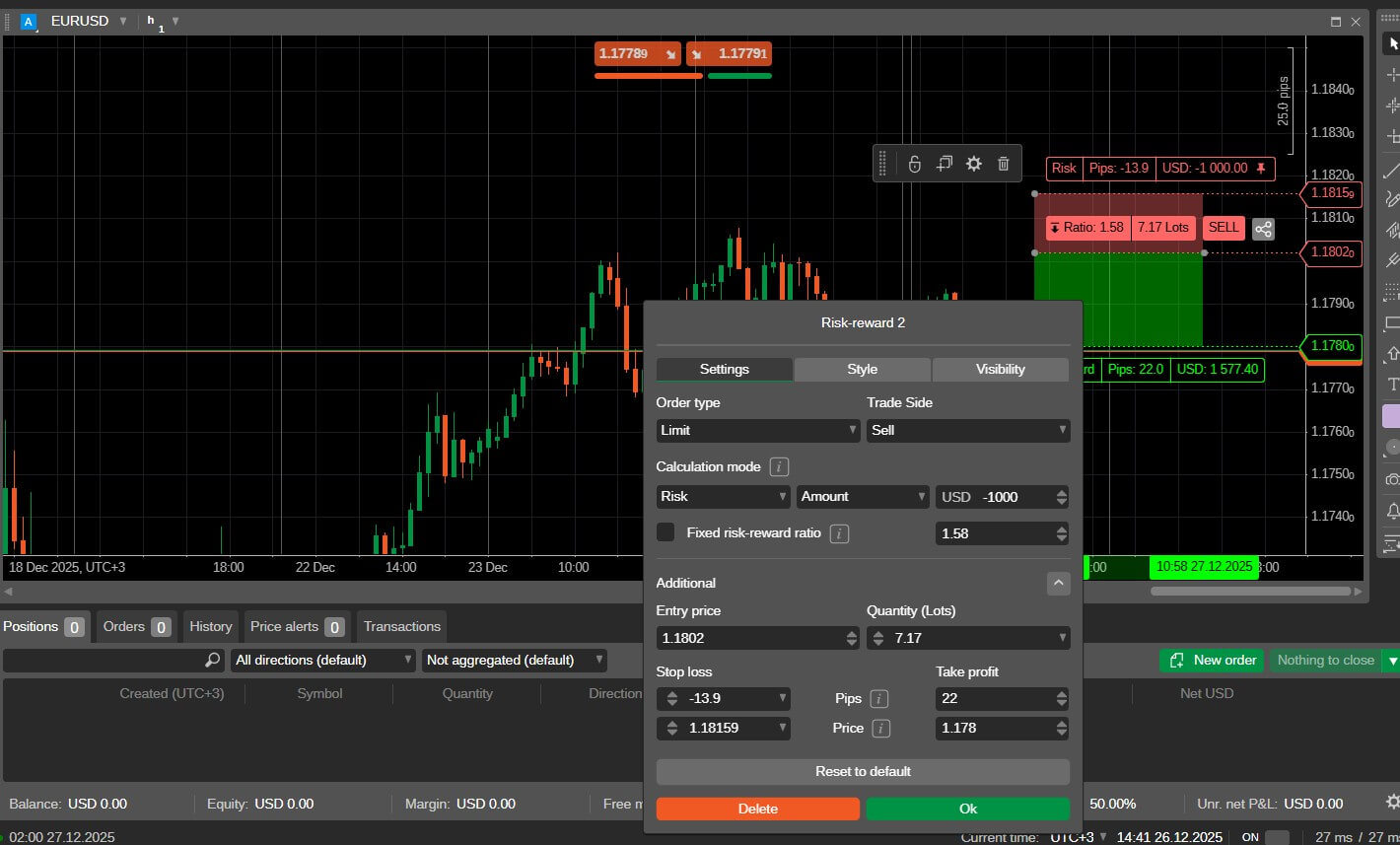
After placing it, the tool appears with entry, SL, and TP levels ready to adjust.
Let’s look at how you might use the Risk-Reward tool in a trade.
Open a chart and place the Risk-Reward object. Set your entry level, then drag the stop-loss to where the trade idea would be invalid and place the take-profit where you think price has room to reach.
As you move these levels, cTrader updates the risk–reward ratio and can even calculate the position size based on the risk or reward you choose.
Once you’re comfortable with it, you don’t need to build it from scratch every time. You can duplicate the object, adjust it for a new setup, or simply move it to another price area. If your chart becomes busy, you can easily edit, hide, or remove Risk-Reward objects through the chart or the object manager.
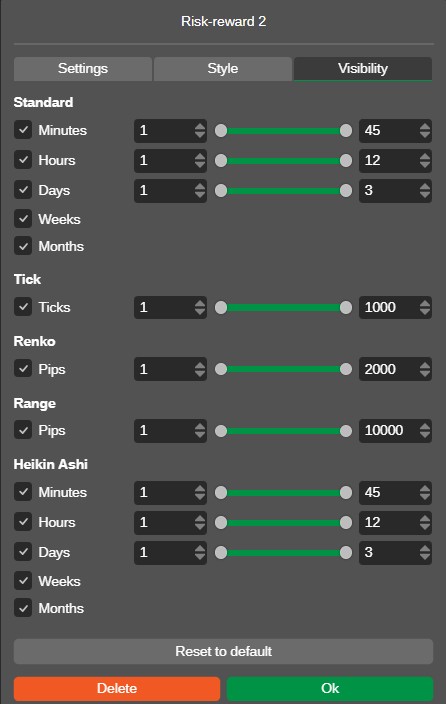
Lastly, you can manage additional settings like style and visibility. The Style tab controls how the object looks on the chart. You can adjust the colors of the risk and reward areas, change line thickness, and fine-tune visual elements like borders and transparency.
On the other hand, the Visibility tab controls which chart types and timeframes your Risk-Reward object appears on. You can choose if the RR plan should be shown on 1-minute charts, 1-hour charts, daily charts, Renko charts, tick charts, and more.
This is the part that really makes the Risk-Reward tool useful. Instead of guessing lot size, you tell cTrader how you want the trade to be controlled, and it does the calculation for you. There are three main ways to use it:
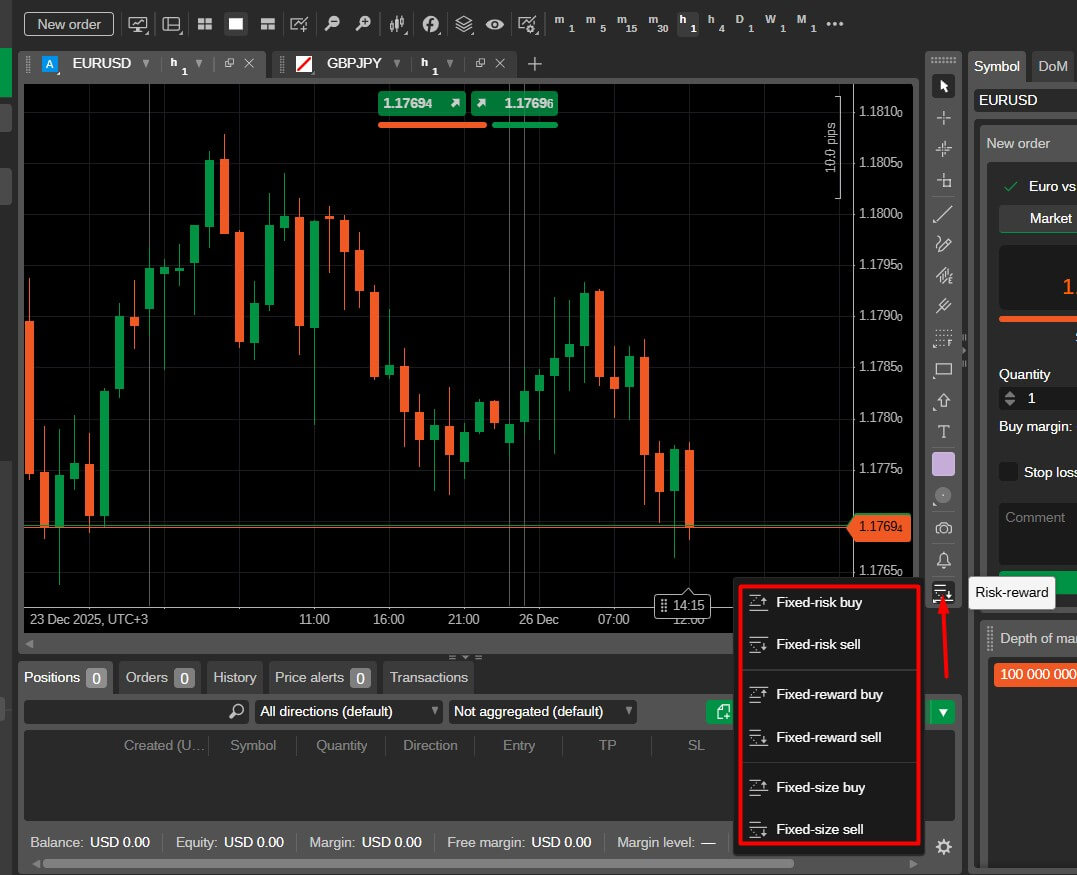
Most traders use Fixed Risk, because it keeps losses consistent across trades and removes surprise exposure. You decide how much you’re willing to lose, and cTrader calculates the position size.
You decide how much profit you want to target, and volume adjusts to match that potential return.
You choose the lot size first, and the tool simply shows the risk and reward outcomes.
The tool is simple, but few things can confuse traders at first. Here are the most common issues and how to handle them quickly.
“My position size looks too big or too small.”
It happens because your stop-loss is too tight or too wide, or because you’re using the wrong calculation mode.
→ Check whether you’re using Fixed Risk, Fixed Reward, or Fixed Size, then adjust accordingly.
“The order executed at a different price than the entry line.”
If you choose Market Order, it executes at the current market price, not your visual entry line.
→ Use Limit, Stop, or Stop-limit if you want price to reach your planned level first.
“My Risk-Reward doesn’t match what I planned.”
Sometimes moving TP or SL accidentally changes the ratio.
→ Use the option to lock the Risk-Reward ratio if you want a fixed R:R like 1:2.
“I can’t see or manage my Risk-Reward objects easily.”
Charts get busy. It happens.
→ Open the Object Manager to show, hide, duplicate, or delete Risk-Reward tools cleanly.
Does cTrader calculate position size automatically with Risk-Reward?
Yes. If you choose a fixed risk or fixed reward mode, cTrader calculates the volume for you based on your SL and TP distance.
Can I lock a specific Risk-Reward ratio like 1:2 or 1:3?
Yes. You can lock the ratio so when you move SL or TP, the other adjusts automatically.
Does the Risk-Reward tool work with limit and stop orders, or only market orders?
It works with Market, Limit, Stop, and Stop-Limit. Just make sure you select the right order type in the tool.
Why did my trade execute at a different price than the entry line?
You likely used a Market Order. Market executes instantly at the current price. Use Limit/Stop if you want execution at a specific level.
Can I use the Risk-Reward tool on mobile?
Yes. It’s available on cTrader Mobile as a chart object. You place it with taps instead of drag-and-drop, but the logic is the same.
Sign up in seconds for free, access your platform, and start trading with ease.

 Biggest Manipulations in Financial Market History
Financial markets have seen their share of manipulation over the years. Here are seven of the biggest cases in modern history.
Detail Petrodollar System: Why It Still Matters
Energy markets depend on supply routes, currency systems, and trade infrastructure determine prices, inflation, and financial stability across the global economy.
Detail Why Precious Metals Softened During War
Precious metals weakened during the war as investors moved into cash. Liquidity need, margin calls, and shifting positioning explain the market reaction.
DetailThen Join Our Telegram Channel and Subscribe Our Trading Signals Newsletter for Free!
Join Us On Telegram!


